Personal finance, made clear
Make sense of your money.
Balanced takes the place of the messy spreadsheet you've been meaning to keep. It gives you the structure — and the gentle guidance — to track what you have, understand where it goes, and learn how you really spend.
No bank connection, ever. Balanced never asks for your banking login — figures come from a CSV you export yourself. Your data is yours to export or delete at any time.
How it works
Set up once. Then a few minutes a month.
Balanced is built around a monthly habit: enter what happened, see what it means, adjust. The loop below is the whole method.
Setup · once
Add your accounts, the categories that match how you spend, the budget you want to hold yourself to, and the assets and debts you want to watch. Balanced seeds a sensible starting set — refine it as you go.
Step 1 · Enter your month — two ways
Get the month's numbers in however suits you. When something doesn't fit, add a category on the spot — the sheet learns the shape of your spending.
Option A · Transactions onLet your statements do the work
Import a bank statement and Balanced sorts every transaction into categories, then fills your budget actuals for you.
Option B · ManualType the figures in yourself
Prefer to stay hands-on, or not connect a bank? Enter your numbers straight into the budget sheet — no imports.
Step 2 · Compare plan to reality
Your categorised spending lands beside the budget you set. The overspends are impossible to miss — and that gap is the lesson.
Step 3 · Update your balances
Tick through the assets and debts you track — a few minutes to a fresh net worth on the balance sheet.
Step 4 · See where you stand
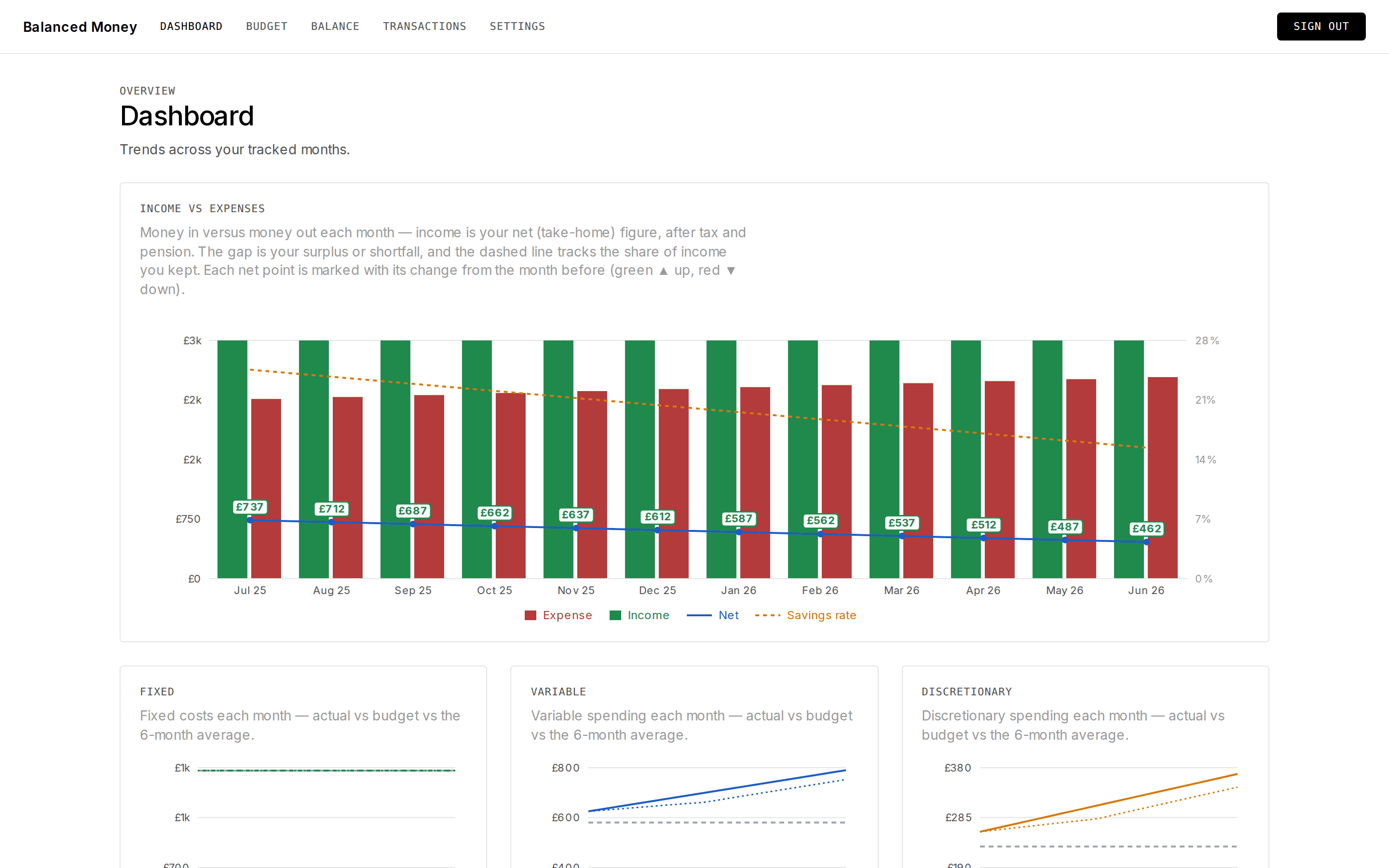
The dashboard tells the month's story — spending, cash flow, net worth — and the plan shows whether you're still on track for your goals. Then close the month and live your life; an optional email nudges you when the next one is ready.
Features
Structure where you'd otherwise wing it.
No more rolling your own tabs and formulas. Balanced gives every part of your money a proper home — and guides you to what actually matters.
Budget
Budget — then learn how you really spend.
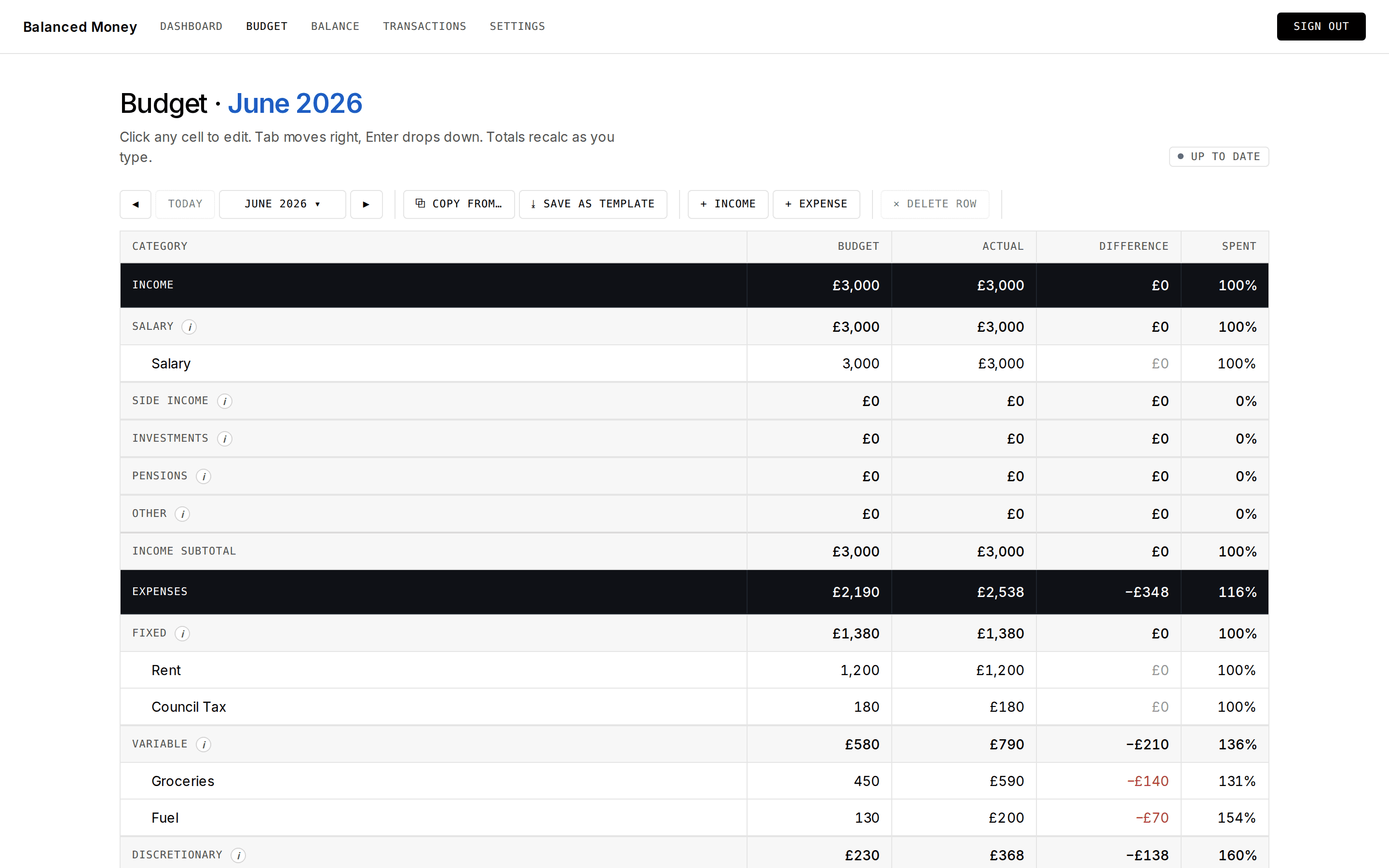
Set a budget for each category, then watch your categorised spending fill in beside it. The gap between the plan and the reality is the lesson: Balanced makes it impossible to ignore where your money is actually going.
Balance
Wealthy, or just spending?
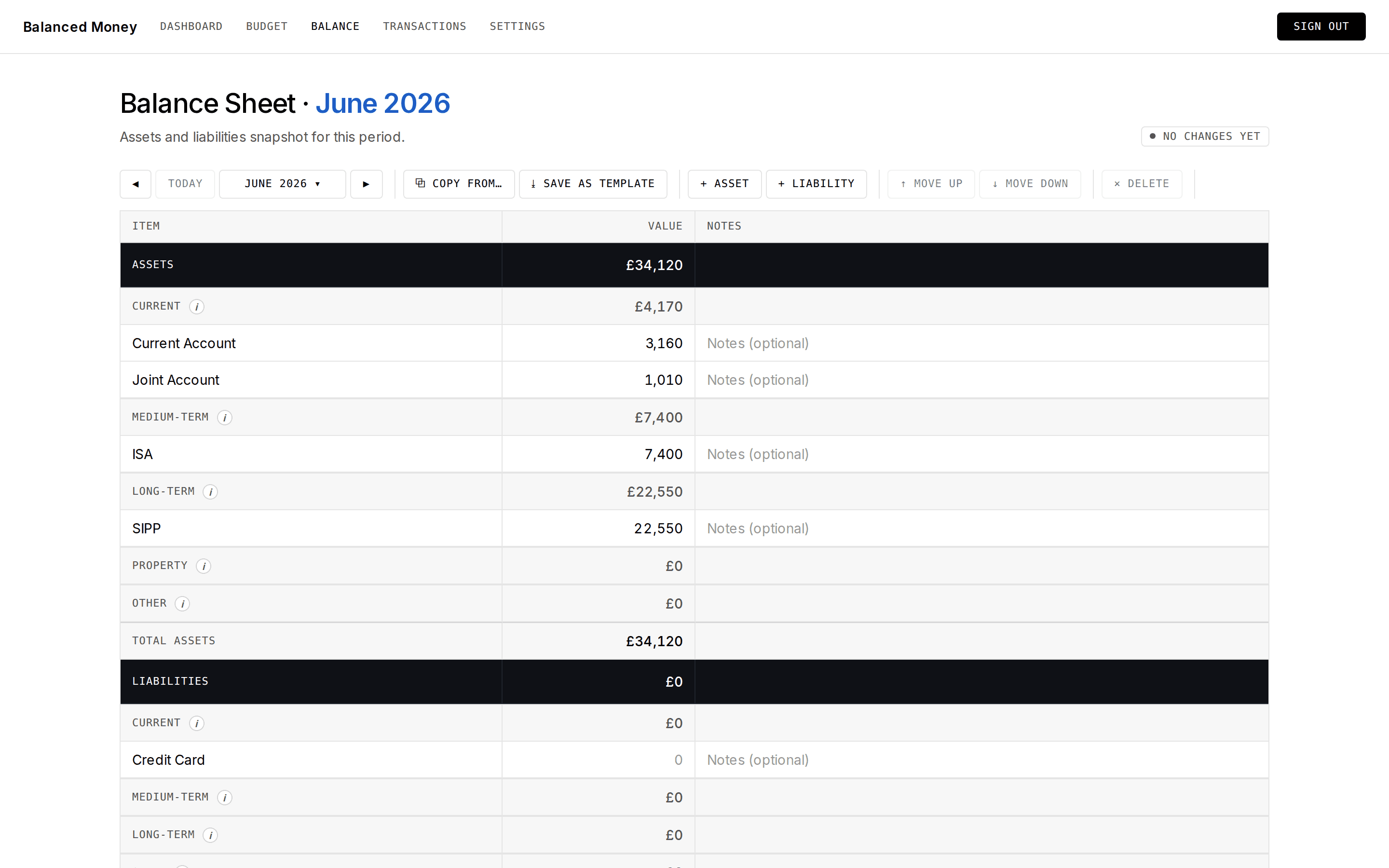
Your bank balance lies. Big pension contributions can leave you feeling broke while your net worth quietly climbs; a month of treats can feel rich while your assets go nowhere. Balanced sorts what you own and owe across short, medium and long-term horizons — so you can see whether you're truly getting ahead, and think past this month.
Transactions
Turn a bank statement into understanding.
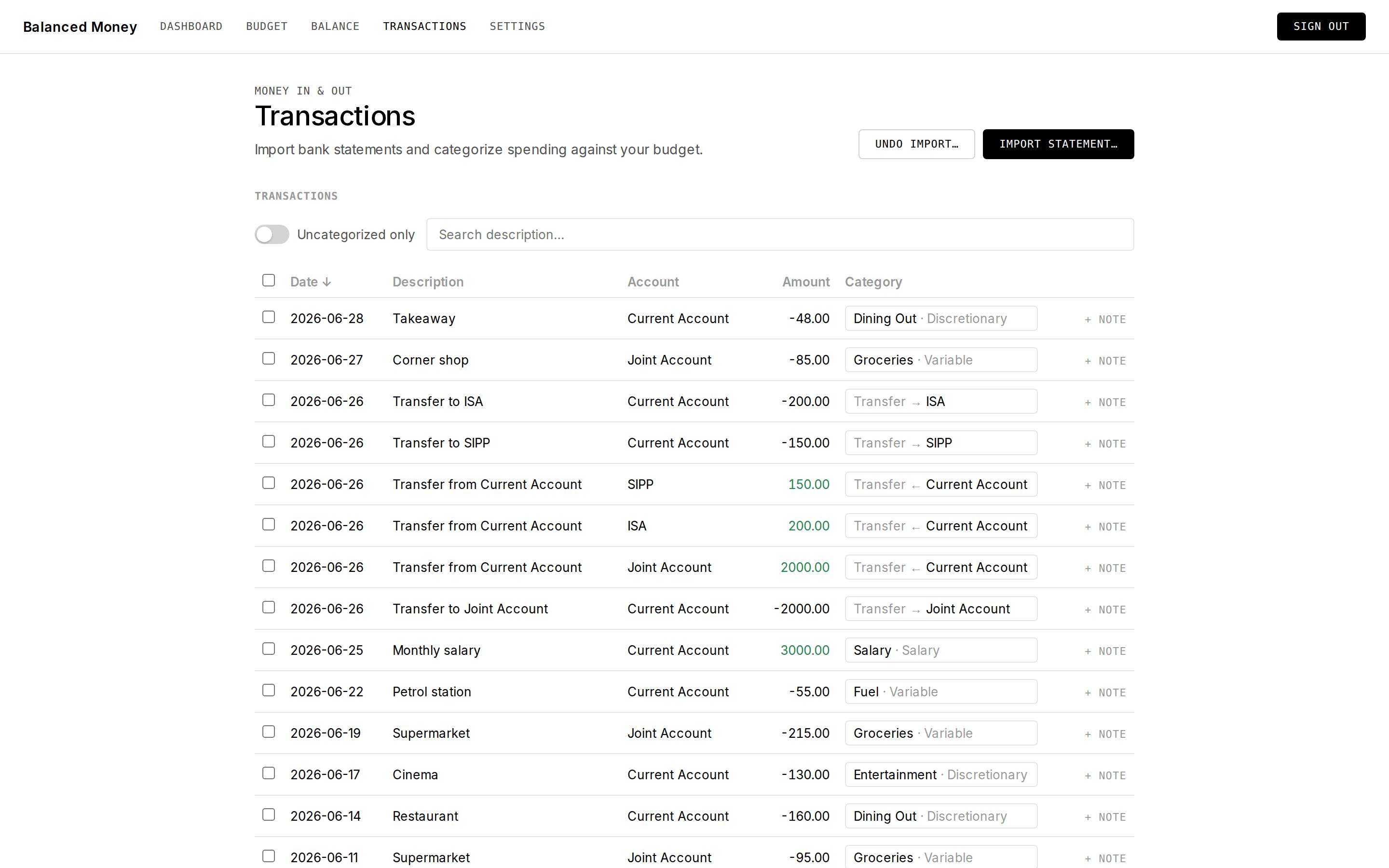
This is where Balanced earns its keep. Switch transactions on, drop in a statement, and a wall of cryptic bank rows becomes a clear, categorised picture of your month — and from there, every chart, budget and balance fills itself in.
- ImportDrop in a CSV statement and Balanced maps the columns for you.
- Auto-sortEach transaction lands in the right category, ready to review.
- Bulk editsRe-categorise or clear dozens of rows in one go — no row-by-row slog.
- Safe by defaultDuplicate-aware on import, and any import can be reversed in one click.
Plan
Will the money last?
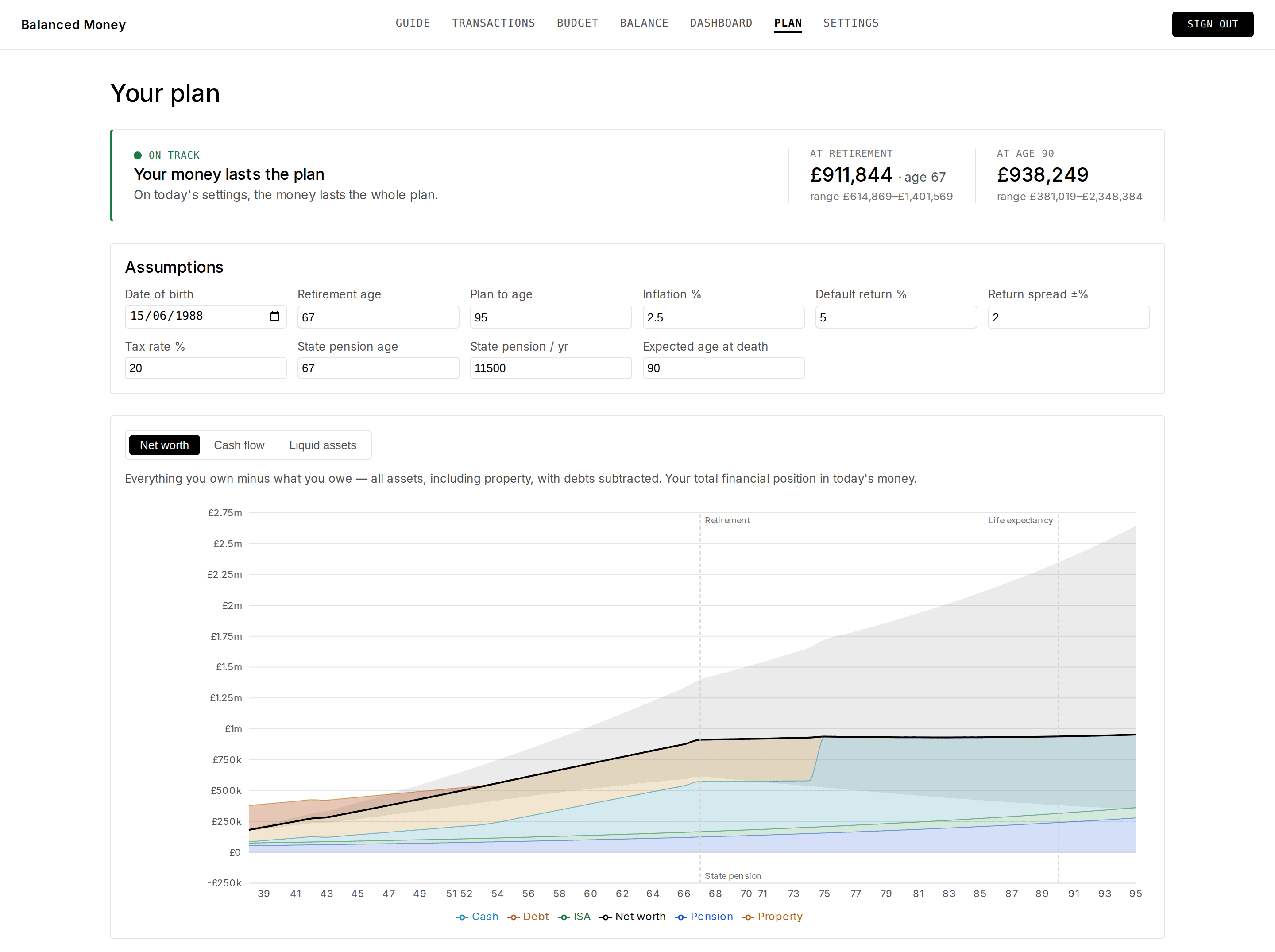
Give Balanced your date of birth and it turns the accounts and budget you already keep into a forecast: what you're worth each year, when the mortgage finally clears, whether the pension outlives you. Retire a year later, sell the flat at seventy-five, expect a point less growth — the whole projection moves while you watch, and tells you plainly whether it still works.
The details
It's the small things that make it tick.
The thoughtful touches that turn "a place to type numbers" into something that actually tells the truth about your money.
Getting the month in
Columns guessed, not demanded
Balanced reads your statement's header row and works out which column holds the date, the description and the amount — then shows you what it guessed, so nothing is written on an assumption you never saw.
Duplicate-safe imports
Re-import an overlapping statement and Balanced spots the rows you already have, so nothing gets counted twice.
Reversible imports
Imported the wrong file? Undo the entire import in one action — the ledger snaps back to exactly where it was.
Less work every month
It learns your merchants
File “TESCO STORES 3421” once and the next import files “TESCO STORES 2211” the same way — the till and reference digits are ignored, so a shop only has to be taught once.
Carried-over values say so
Copy last month's balances forward and they arrive dimmed, with a note. They stay dimmed until you confirm each one, so last month's figure can never quietly pose as today's.
Whose date order? Yours
03/04 is the 3rd of April to one bank and the 4th of March to another. Balanced asks which order your statement uses rather than guessing and booking half your month into the wrong day.
Numbers that tell the truth
Transfers aren't spending
Move money between your own accounts and Balanced treats it as a transfer, not spending — so your expenditure stays honest and you don't look poorer or richer than you are.
Live & in sync
Edit or import a transaction and every chart, total and budget recalculates instantly — no refresh, no stale numbers, no "recalculate" button.
Unbudgeted spending can't hide
Spend in a category you never budgeted for and it still appears on the sheet, showing a £0 budget against real spending — the thing you didn't plan for is the thing you can't miss.
Reading the result
Up isn't always good
Every headline figure knows which way is progress: net worth climbing is green, spending against budget climbing is red. Nothing is congratulated merely for going up.
It won't invent a comparison
One month in, there is no “change since last month”, because there isn't one. And “0% of budget used” stays hidden when nothing was budgeted — it reads as restraint when it means the opposite.
A range, not a single number
Your plan projects three ways — returns better, worse and as expected — so the verdict reads “runs short at 82, between 78 and 91” rather than pretending anyone knows the year.
Yours, and only yours
Notes & original detail
Add a note to any transaction and keep the original statement details beside the tidy, categorised version.
An email with no numbers in it
The optional monthly nudge says your month is ready and nothing more — no balance, no total, no category. Your figures stay behind a login rather than sitting in an inbox.
Your data, yours
Export everything to a file, clear your data, or delete your account outright — no dark patterns, no hostage-taking.
Get started
Put the spreadsheet down.
Create a free account and let Balanced give your money the structure it's been missing — and guide you to what matters.
Get started